
Hizir Apaydin
-
Posts
140 -
Joined
-
Last visited
Everything posted by Hizir Apaydin
-

importing Google ground image for near shading
Hizir Apaydin replied to Ree's topic in Shadings and tracking
Dear Ree, You can use the zone tool to fill the area with modules: https://www.pvsyst.com/help/zones_of_tables.htm In the zone tool, you have the option to set the height of the modules from the ground. Regards, Hizir -
Unequal area and lenght issue while importing ground data as CSV
Hizir Apaydin replied to emir's topic in How-to
Dear Emir, It's hard to analyze the discrepancy without viewing your files. Could you please send them to support@pvsyst.com (your source .KML or .KMZ file if you have them and your CSV file) We will study them in detail. Regards. Hizir -
Dear JaHu, We thank you for providing us details of your pricing. Currently in PVsyst you can define 2 different daily tariff (Peak / Off Peak), which can be combined with 2 seasonal tariff (summer/winter). It's not possible to define a third daily pricing, nor a weekday depending price (price different for Saturday and Sunday in your example). The only way is to use a custom CSV file with all the hours of the year and the corresponding price for this hour. However, in your example you have a size dependent charge (maximum demand and network access charge), which is currently not managed by PVsyst in the economic evaluation. You will be able to only define the fix pricing corresponding to each hour (2.290, 1.850, 1.410). For the monthly charge dependent part, a solution would be to create a fixed yearly operating cost corresponding to the total manually precalculated charge for your installation size). Regards. Hizir
-
Dear Debbie, This is indeed a known issue of the last version. We have already corrected it and the fix will be available in the upcoming version. Regards. Hizir.
-
Dear Marco, Yes we have already noticed this issue. A corrective patch will be available soon. Regards Hizir
-
Can't generate simulation report
Hizir Apaydin replied to Antonnio Lim Jigong's topic in Problems / Bugs
Dear Antonnio, You are kindly invited to send your log files (menu File>Export logs), customer ID and license number to support@pvsyst.com Regards. Hizir -
Add Decimal Place to Azimuth and Tilt in PVsyst Output Report PDF
Hizir Apaydin replied to kjs55's topic in Suggestions
Dear kjs55, We thank you for this suggestion. We will study the possibility of implementing this modification or not for a later version. Regards -
Dear DVIR, The transfer of project workspace is not automatic. You have to export your workspace from the old computer and import it on the new computer. From PVsyst main menu, open "File", then "Workspaces", "Export", "Export workspace to ZIP file" On the new computer, open "File", then "Workspaces", "Import", "Import workspace from ZIP file" If you need more specific assistance on this subject, please send an email to support@pvsyst.com Regards.
-
Dear Julien, We thank you very much for your advices and for providing us this example. We have already made an important refactoring of the economic evaluation tool for an upcoming version. Feed-in and consumption tariffs will be clearly separated in two disctinct tabs, with their own and specifics parameters (currently, defined peak/off-peak time ranges apply for both tariffs). Moreover, accounting depreciation will be configurable specifically for each asset and not globally. And finally, IRR (Internal Rate of Return) value has been added to the list of financial results. The example you provided is very interesting in term of interface and usability. Currently in PVsyst, you can define fully customized prices for all the hours of the year by importing a CSV file, even it is less straightforward and ergonomic. We have taken note of all these elements and will continue to improve our economic evaluation tool. Regards.
-
Dear Shantanu, We thank you for reporting us this issue. Could you please export and send your project to support@pvsyst.com so that we can investigate on this issue (File>Export project) Regards.
-
Dear Thet, The Carbon Balance is currently part of the Economic Evaluation tool. You can access it from "Project" dialog, "Economic evaluation" button, then click on "Carbon Balance" tab. You can either choose to print it or not in the final report by checking/unchecking the corresponding checkbox Regards,

-
Dear Ashish, We are actually working on this feature. It will be possible to add notes on a project or variant through a "notepad" dialog accessible from all the windows of PVsyst. This feature should be available before the end of the year. Regards.
-
PVsyst crashes when loading a "grid unavailability profile"
Hizir Apaydin replied to julmou's topic in Problems / Bugs
Dear Julmou, This issue has indeed been fixed in the last version of PVsyst (7.2.18) Kind regards. Hizir -
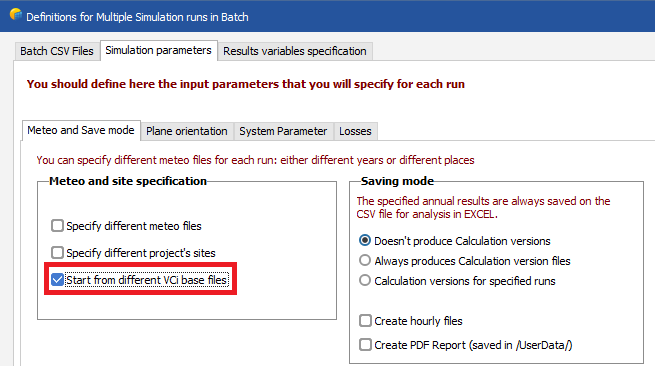
Dear jammyc, Thank you for your suggestion. Such functionality is not implemented yet in PVsyst. However the batch mode tool may partially meet your needs and looks like what you are describing. Indeed, you can specify different variants and parameters as input of the batch mode and get the predefined output variables in a CSV file We have taken into account your suggestion and we will study it. Thank you.
-
Hi Julmou, Thank you for this detailed explanation of you pricing strategy. Unfortunately, the production-dependent pricing is not implemented in PVsyst. only time-dependent pricing is available. We have taken note of your request and will study it with interest in order to include it in a future version. Kind regards
-
Dear Mark Norman, There is indeed a display issue with the compass for projects in Southern Hemisphere. This will be fixed in the next version. All the calculations are correct. Kind regards
-
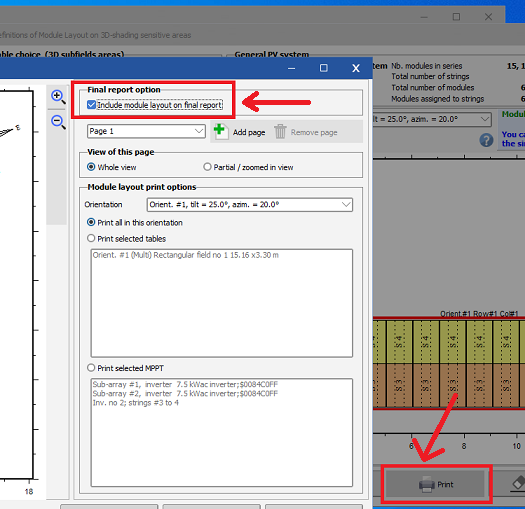
Dear Fawaz, After clicking on"Print" from the Module Layout, you can check "Include module layout on final report" and configure how you want it to be displayed: Regards
-
Dear Fawaz, The company name is automatically filled from the company name present in the license file. If you want to change your license's company name, please send a mail request to admin@pvsyst.com Kind regards.
-
Dear Julmou, The discount rate represents the yearly loss in value of your money over the life of your project. For example, if your initial investment is 100$ and the final value of your project is 150$ after 20 years, your project may not be profitable if 150$ after 20 years represents much less than 150$ of today. There is no specific rule for the discount rate calculation. It implies a detailed analysis taking into account the inflation, the interest rate of the market, and some financial and ecomomical projections. If you want to estimate a simple value, you could use the interest rate of the market, and add a safety margin. For example, if your bank proposes you an interest rate of 3%/year for a deposit on an account over a period of 20 years, you could set a discount rate of 3.5% in PVsyst (3% + 0.5% safety margin). This means that with a positive NPV at the end of your project of 20 years, your photovoltaic investment would be more profitable than putting your money on an interest-bearing deposit account for the same period. Regards.
-
Dear jammyc, Yes that is correct. All costs related to modules and inverters are automatically updated from the system. The other installation costs and the operating costs remain fixed as the price variation may not be proportional to the module or inverter quantities (for example, multiplying the number of modules by 2 does not necessarily multiply the "environmental studies" or the "insurance" costs by 2). For a financial performance comparison between different sizes of system, manually performing the economic analysis and reviewing all individual costs for each system would be more precise than using the batch mode comparison. Regards,
-
Dear jammyc, The price type selection (global, by wc, by m2) is applied for all the costs you defined. Let's say you define a fixed grid connection cost of 10000$. Then you want to define module price per Wp. So you change from "Global" to "by Wp". This will automatically transform the grid installation cost price from 10000$ to a price per Wp (for example 1$ if you have an installation of 10000wp). All other costs you defined are also updated to a "by Wp" cost. However, when you change your quantity parameters in PVsyst system Window, only system dependent costs are automatically updated in the economic evaluation (module, inverters and battery costs according to quantity). None of the other costs are changed, even if you defined them per wp or per square meter. If you defined a custom cost item, its amount is not changed when resizing your system. The new cost calculation for system dependent cost is done by quantity. Let's say you have defined a module cost of 1$/wp in the ecomomic evaluation. If you change your module quantity in the system, the price calculation is done according to quantity ("Global option"), even if you selected "by Wp" to initially define it. But the cost will still appears as "by wp" in the ecomomic evaluation window, but its value should have been modified. Regarding the batch mode, the economic evaluation parameters are not modified. However you can select economic evaluation parameters as output parameters of the batch. The updated costs will then appear in the results column of your resulting excel file. You have to check the "Number of modules" or "Number of inverters" parameters in batch simulation input parameters if you want to see the economic impact of changing these quantities in the batch output results. Kind regards
-
Version 7.2.11 - Output File not exporting Decimals as Points
Hizir Apaydin replied to msykes's topic in Problems / Bugs
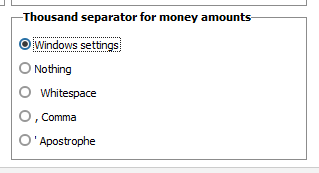
Dear msykes, We have noticed an issue with PVsyst 7.11 when selecting "Windows settings" for "Thousand Separator for money amounts". If this is your case, could you try changing this to another value ("Nothing", "Whitespace", "Comma" or "Apostrophe"). If the problem still remains, please contact support@pvsyst.com. We thank you and remain at your disposal for any other request that might be required.
-
This license is blocked in this computer
Hizir Apaydin replied to Bertolim's topic in Problems / Bugs
Dear Bertolim, Could you please send your request directly to support team by providing your company and license details from this form: https://www.pvsyst.com/contact/ Thank you. -
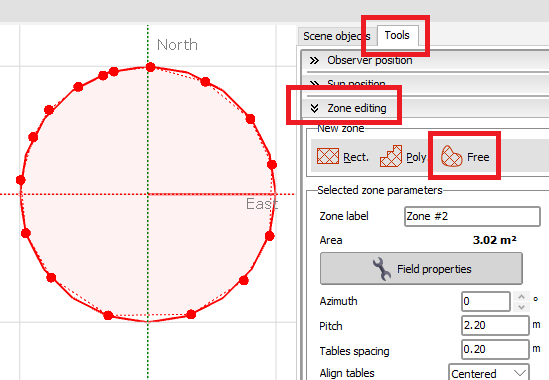
Dear Roberto Bissanti, You can either create a polygonal PV plane from 3D scene menu "Create>Polygonal plane" or create a "Free zone" from zone editing tool of the 3D editor. In both cases, you will have to manually create multiple points to delimit your circular area, there is no predefined circular zone edition tool.
-
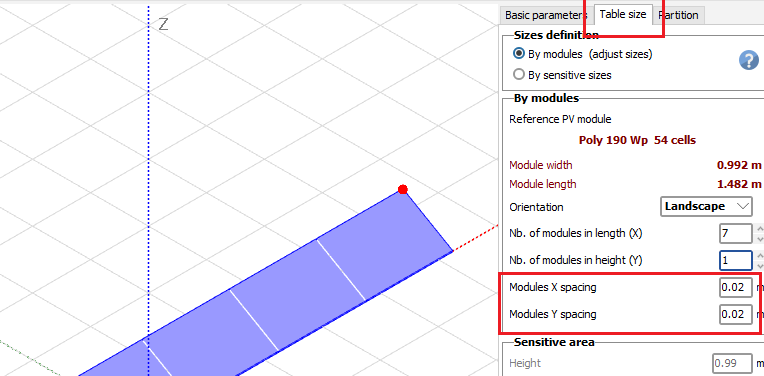
Dear Mubo, 1. Some fields look interpenetrating each other in your 3D scene. Please export and send your project to support@pvsyst.com for an advanced analysis (from PVsyst main window "File>Export projects"). 2. You can modify the space between modules from "Table size" tab of your field object: