All Activity
- Today
-
Hello, You can find an article in our help that discuss the PR calculations: https://www.pvsyst.com/help/project-design/results/performance-ratio-pr.html?h=pr Kind regards
-
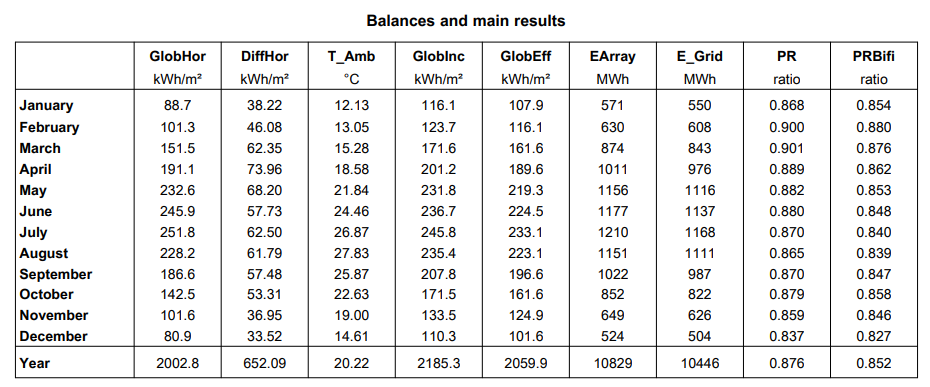
Hello, In the new version, an additional PR column was added for bifacial panels. My question is how the PR is calculated, and whether the simulation takes into account irradiation on both the front and rear sides of the panel. In addition, in your opinion, which PR value is the most accurate and correct one to use?

-

Monthly Meteorological Data Input to PVsyst (TMY – Meteonorm 7.3)
Linda Thoren replied to Abeer's topic in Meteo data
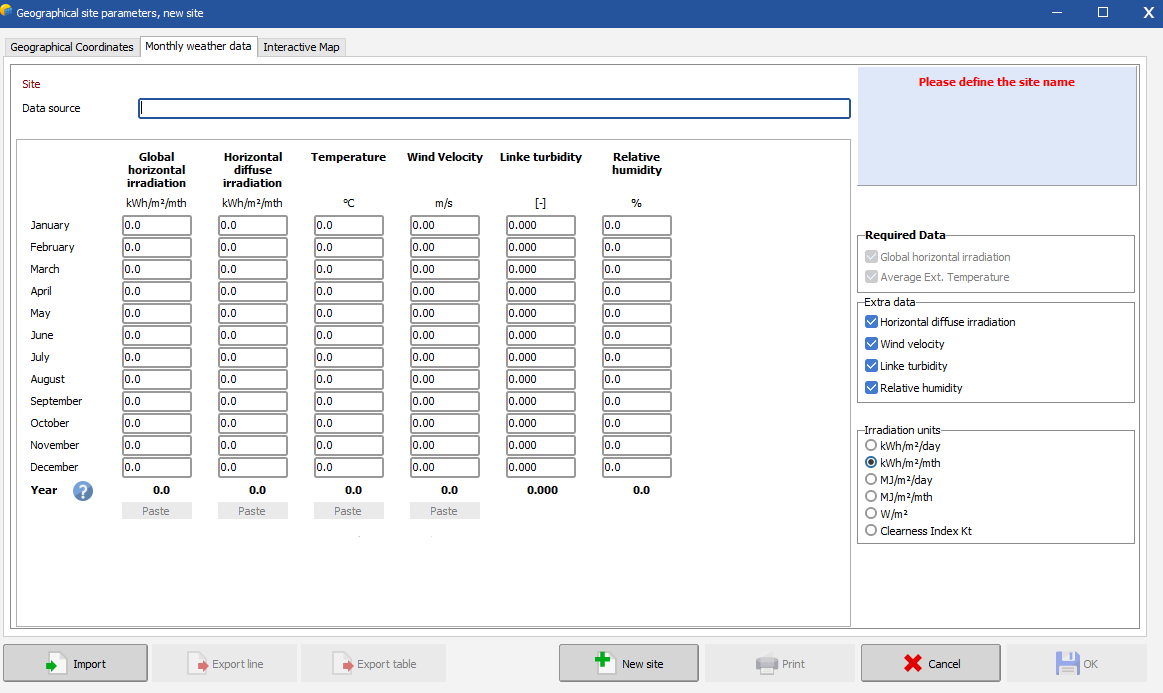
When creating your site, you can simply write or copy your values in the "Monthly weather data" tab
-

Tracking angle limit and effect on daytime production
Michele Oliosi replied to Nathan M's topic in Shadings and tracking
Hi the reason is in the calculation of diffuse and albedo shadings. For more information you can see here: https://www.pvsyst.com/help/project-design/shadings/calculation-and-model/diffuse-losses-with-tracking-systems.html This calculation creates an interpolation profile based on the available tracker positions. By changing the tracker limit, the support pointss of the interpolation profile are shifted, thus leading to (in principle slightly) different shading values. -

Monthly Meteorological Data Input to PVsyst (TMY – Meteonorm 7.3)
Abeer posted a topic in Meteo data
I have monthly weather data for TMY data (Meteonorm 7.3). Could you please advise how to input this data into PVsyst and how to display it in the simulation report? The available data includes monthly ambient temperature and global horizontal irradiation, as shown below: Month Ambient Temperature (°C) Global Horizontal Irradiation (kWh/m²) January 7.5 92 February 8.8 106.5 March 12.7 159.7 April 16.6 187.7 May 21.2 230 June 24.5 242 July 26.8 245.3 August 26.2 225.1 September 23.5 182.9 October 20.5 144.6 November 13.7 104.7 December 9.5 87.2 Year 17.6 2007.7 -
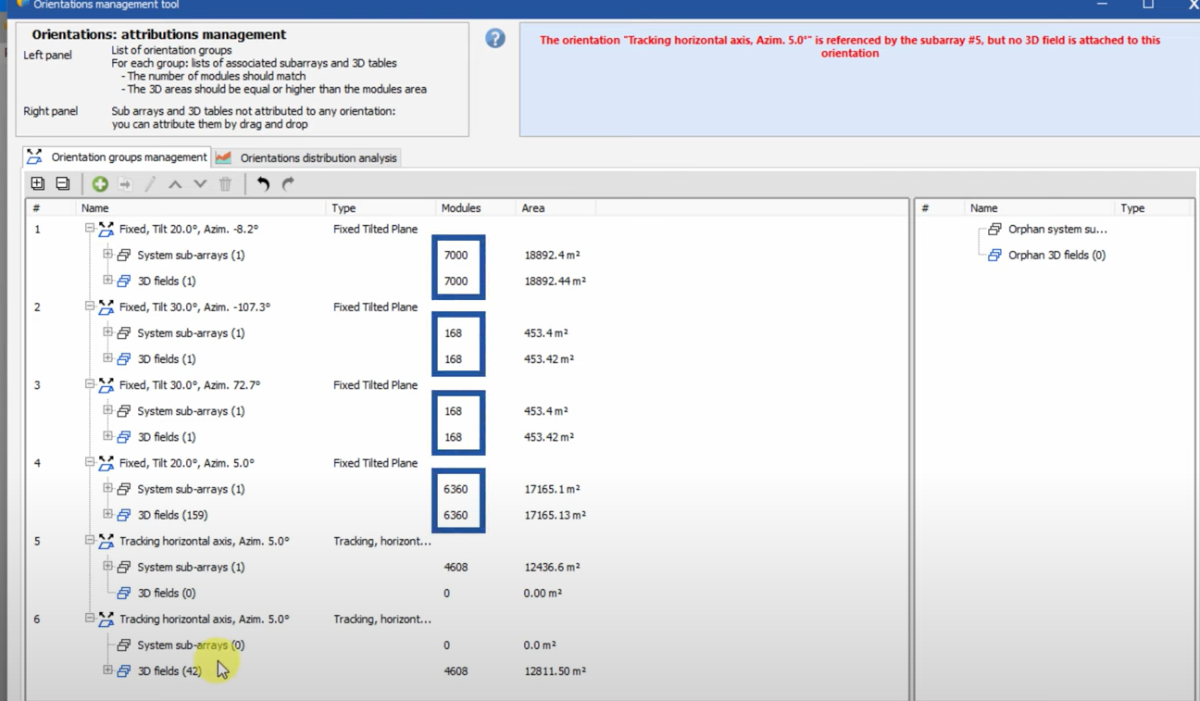
In your print screen you see all the details of the number of modules in each sub-array and each table assign to the defined orientations. The difference between your print screen and the video is that the folders are collapsed. Click on the small minus icon collapse the folder and see the total of modules in the system/3D scene for each orientation. If they do not match, you need to add/substract the modules defined in the 3D scene, or in the system.
-
 Ariyan joined the community
 -
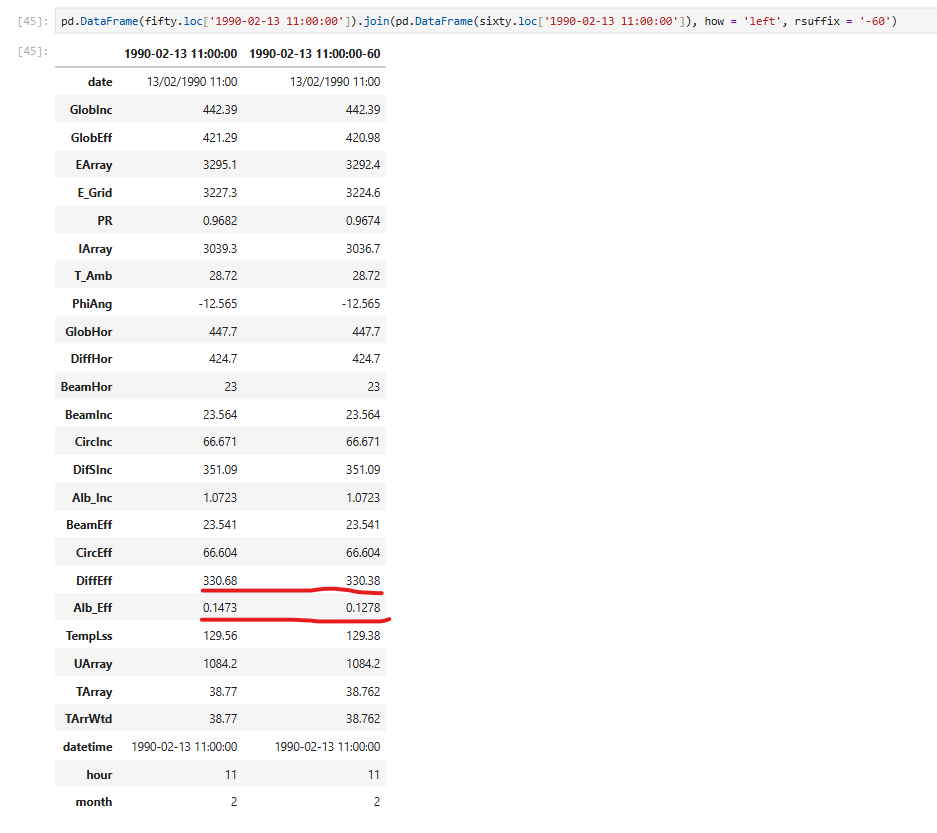
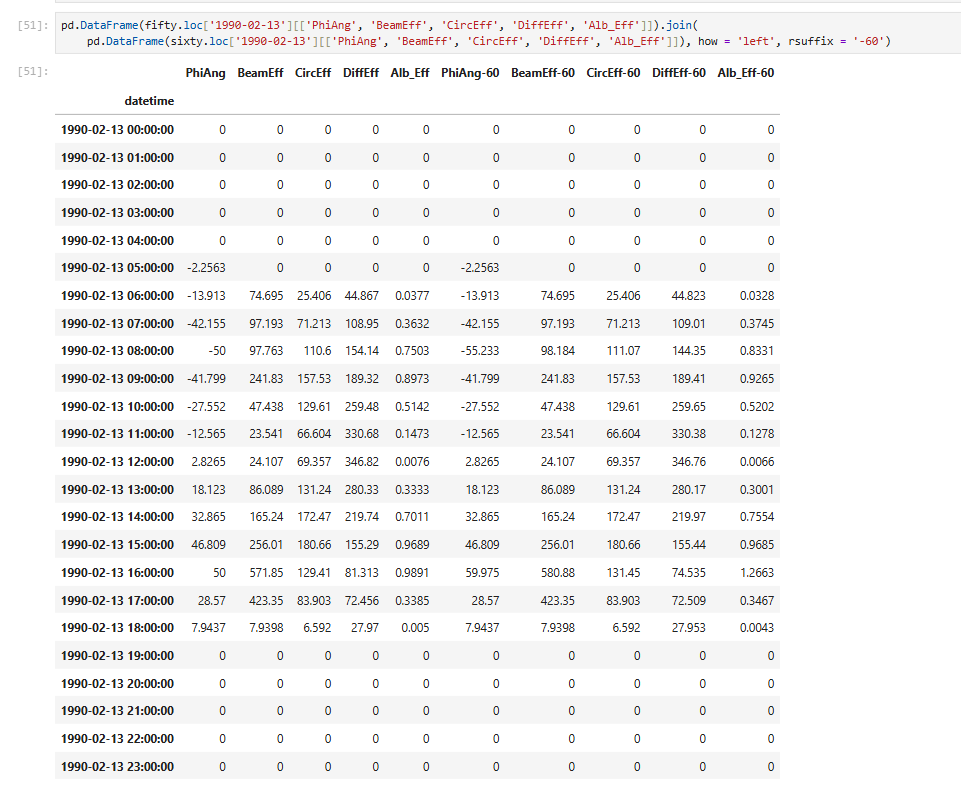
 Hi PVSyst team, I've been doing some investigation into the effect of how energy production is affected by changing the SAT tracker angle limit from 50deg to 60deg. I've created a project with a SAT with +/-50 degrees tracking limit (PhiAng). I've copied this project and changed the tracking limit to +/-60 degrees (PhiAng). No other parameter or input was changed - same weather file, same components, no changes to tracker geometry, 3D model or site configuration. Interestingly, output reduces slightly with a +/-60 degrees limit. While investigating this reduction, it appears that I'm getting a difference in effective irradiance components between the 50 degree and 60 degree simulations at times when the trackers are at the same phi angle. I'm assuming that the difference in calculated effective irradiance components is then driving the differences seen in temperatures, current and energy production. I have attached a screenshot of a single timestamp for both simulations, and a comparison of effective irradiance components and PhiAng across an entire day. At the time shown (11 am, southern hemisphere summer), the two systems should be in *identical* states (same weather data, same system definition, geometry and layout, well outside any periods of backtracking), any ideas why changing the only tracker angle limit would result in these different calculated irradiance values? Thanks
-
Nathan M joined the community
-
 John Phillip Magpayo joined the community
 - Yesterday
-
I've watched the video, but the video does not show how to match the number of modules between the 3D fields and subarrays... how do I make my orientations management tool window look like the one in the video??
-
In the 3D scene you can define each table by modules. In the Orientations management you find detailed information about what is defined for each orientation In the following youtube tutorial you find examples of how to define a 3D scene and how to navigate in the window: On our website you can do a request for a training sessions on various topics: https://www.pvsyst.com/en/training/consulting/
-
Also, I am noticing the following limitation of the software: in the 3D scene there is a way to specify the width and the length of a PV surface while in the system definition there is only an option to specify the area of a PV surface making the whole process of matching the number of PV modules between the 3D scene and the system definition cumbersome at best... unless I am missing something
-
Dear @PranavK, this is new to us and unfortunately I cannot say much without looking at the project. Can you send it over at support@pvsyst.com ?
-
Thank you for your response, but the reason why I posted to this forum is because I could not correct the errors myself. Is there a way to request a call via MS Teams so I can share my computer screen and someone from PVsyst support will provide the assistance?
-
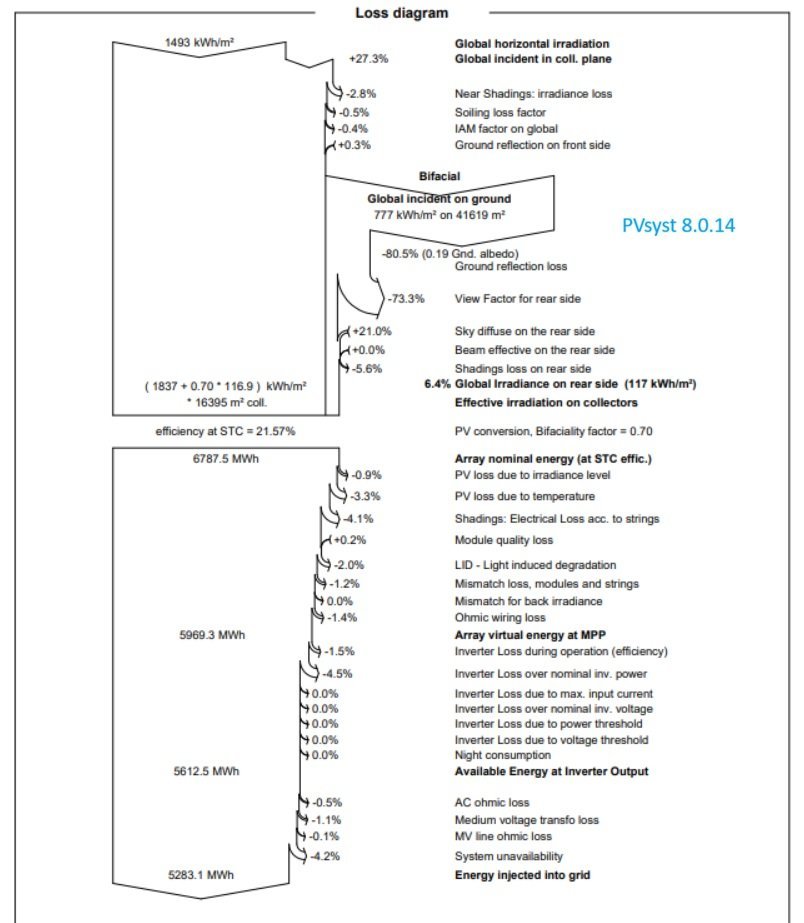
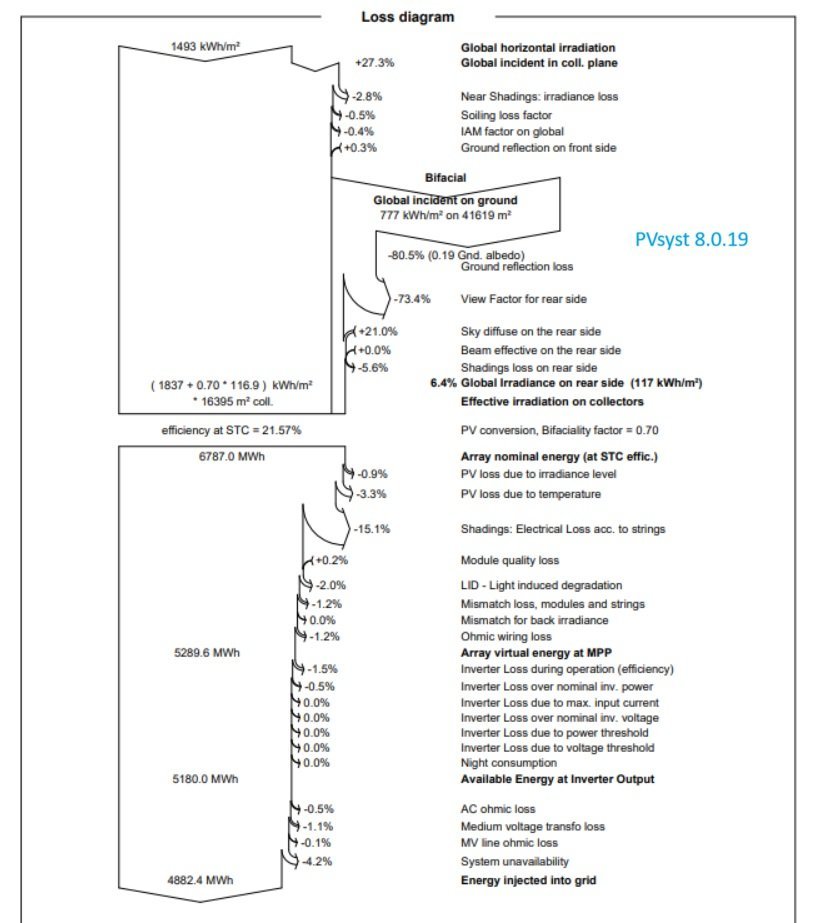
 Hi @Michele Oliosi, I am experiencing a similar issue currently. I've run two iterations of the same project in two different versions 8.0.14 and 8.0.19. All the parameters are the same. The Shadings: Electrical Loss acc. to strings in the latest version jumps to 15.1% compared to 4.1% from the previous version. Also, the Inverter loss over Nom. inverter power loss was 4.5% previously which later decreased to 0.5%. The loss diagrams from both versions are attached. Could you please help with this?
-
 First of all, the definition of the "Solar Fraction" SF = EUser / ELoad is valid for Grid-connected systems. In Stand alone systems this is more complex: it is the Output of the PV system (EOut converter), minus the battery energy balance: SF = ( EOutConverter - EBattCharge + EBattDischarge ) / ELoad. The battery balance (EBattCharge - EBattDisch) includes the difference in SOC between the beginning and the end of the interval, and the battery losses. Therefore: - Over la short period, the Solar fraction is not relevant because of the battery SOC difference, - Over a long period, the SOC difference contribution becomes lower, but may still alterate the real value of the Solar Fraction. Now the battery losses are extremely difficult to evaluate, especially due to the variability of the effective capacity of the battery according to the Charge/Discharge rate: in PVsyst this is an approximation, which may sometimes lead to "positive" battery losses in some cases (depending on your load profile definition). This seems to be the case in your project, where the differences are very low (some few permille). See the Help https://www.pvsyst.com/help/physical-models-used/batteries/battery-model/battery-efficiency.html?h=battery
 -
PranavK joined the community
-
 You can find the detailed explanation to your question in our documentation on the power factor : https://www.pvsyst.com/help/project-design/grid-connected-system-definition/power-factor/index.html Check in particular: https://www.pvsyst.com/help/project-design/grid-connected-system-definition/power-factor/Simulation results.html In short: the power factor that you set in the menu "Energy management", here cos(phi)=0.9, is the power factor at the inverter level. The reactive power will be computed from the available power at the output of the inverter as EReGrid=EOutInv×tan(ϕ). We assume that there is no loss of reactive energy from the inverter to the injection point. However, we assume active energy loss in the AC circuit. Therefore, the power factor at the injection point will be decreased compared to the setting at the inverter output.
 -
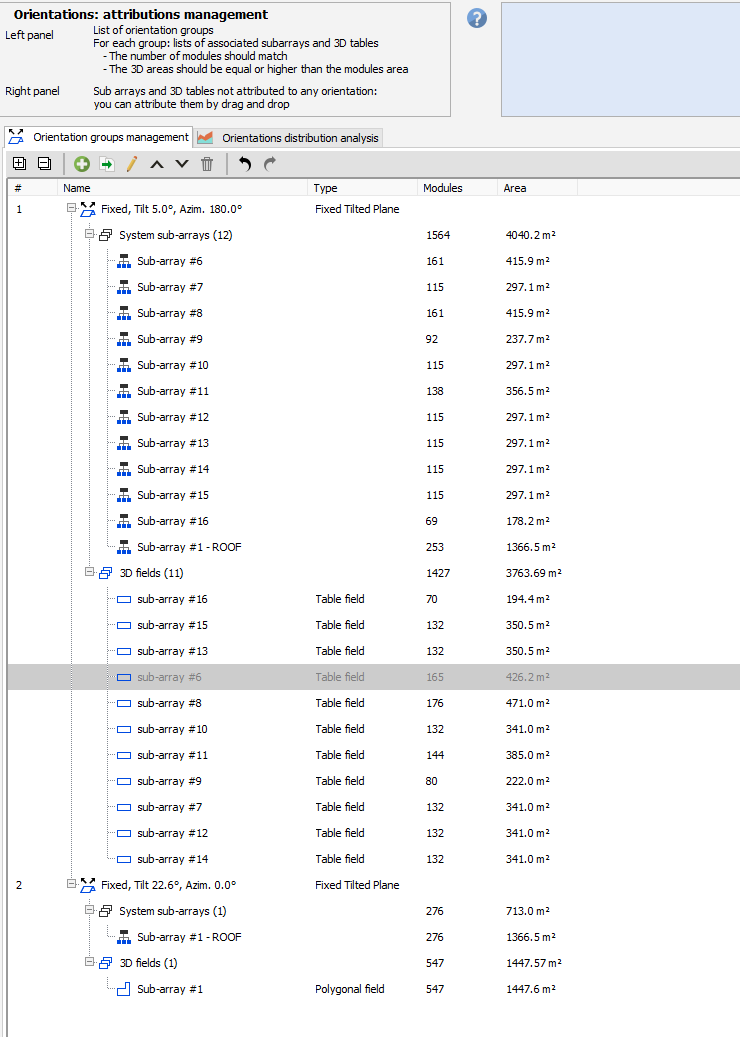
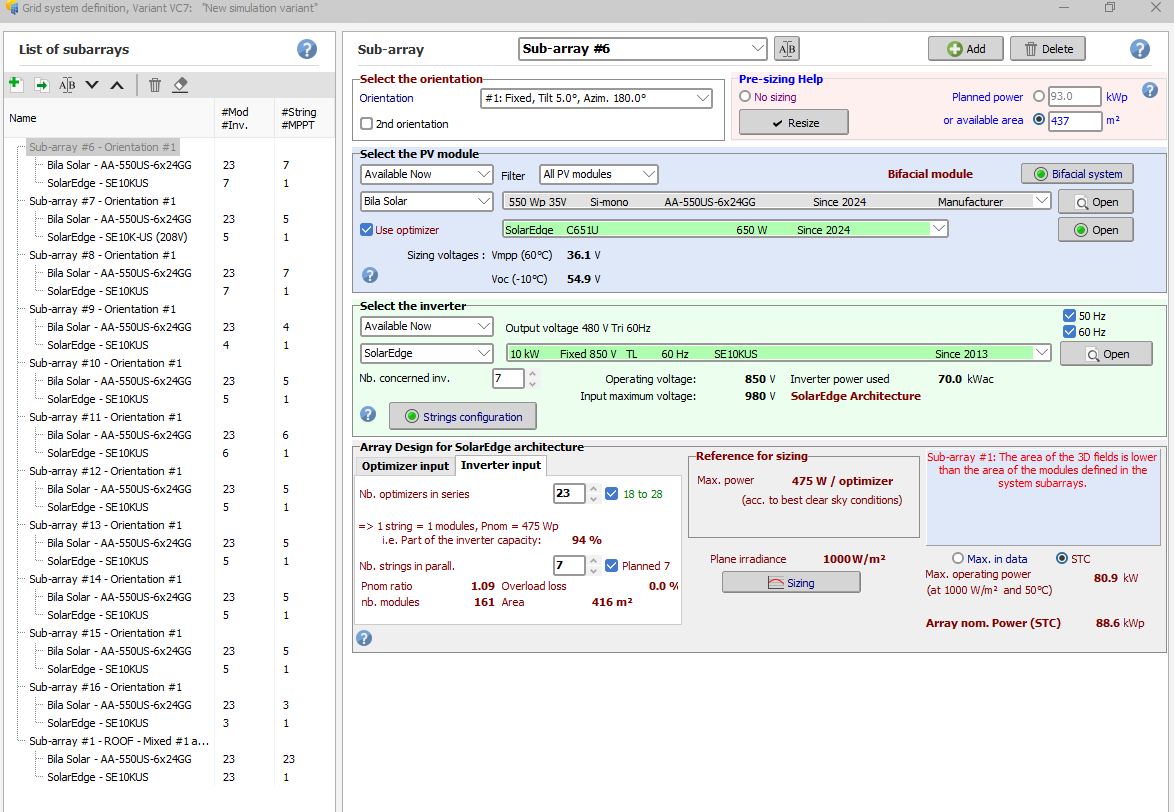
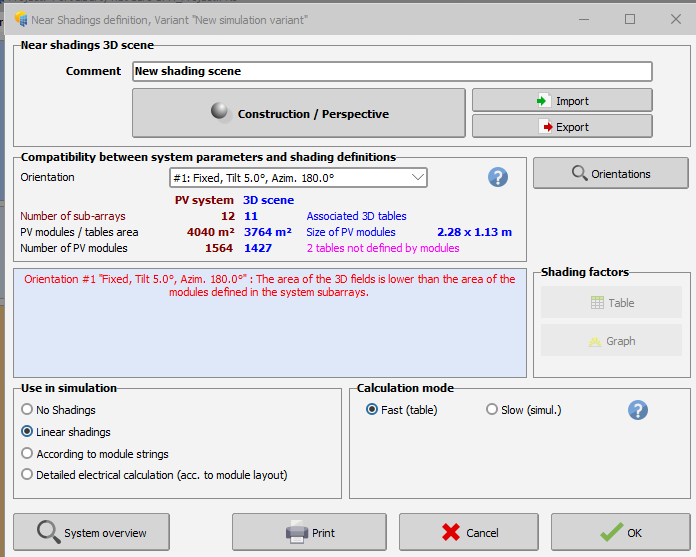
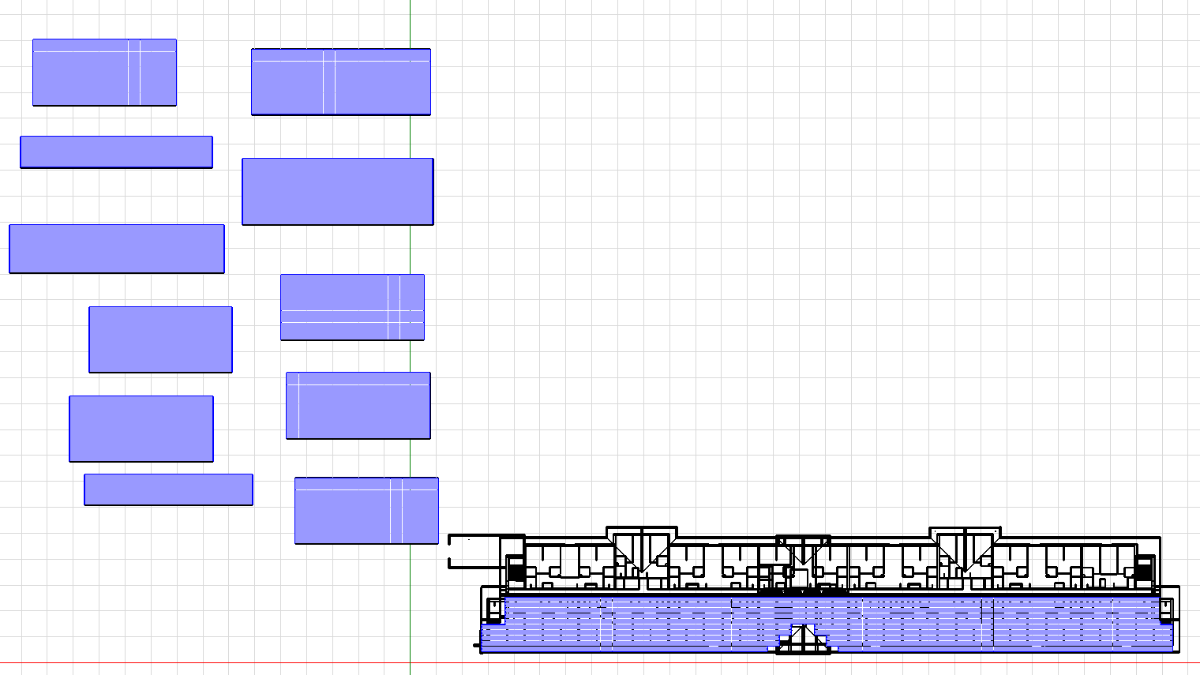
Hello, The error message indicated that the 3D scene and the system definition does not match. For instance, in the first orientation (tilt 5° and Azimuth 180°), 1564 modules are defined in the system but only 1427 in the 3D scene. Verify also that the orientations, are correctly defined. In PVsyst, Azimuth of 0° is towards the equator, and 180° thus the opposite orientation (North is the northern hemisphere and South is the southern hemisphere)
- Last week
-
I am designing a hybrid (roof + carport) PV system and getting several error messages referenced in the attachments. Could you help me to correct the errors?
-
-

Nominal discount rates, LCOE and PBP calculations
Hizir Apaydin replied to Gavin M's topic in Suggestions
Dear Gavin, Thanks for the detailed analysis. These are valid points and we agree that the current LCOE formulation in PVsyst does not strictly match the standard, financing-neutral definition commonly used in the literature. We also confirm that the discount rate used in PVsyst is the nominal one. We’ll take a closer look at this internally, both to better clarify what the current indicator represents and to evaluate how we could move closer to commonly accepted LCOE formulations (project-level, WACC-based) in the future. Appreciate you taking the time to raise this and share your perspective. Best regards. -
 USPE joined the community
 -
Difference in Produced Energy while comparing with the ageing
Linda Thoren replied to hritik's topic in PV Components
Please send your project to support@pvsyst.com and we can have a closer look. Kind regards -
 AlbanLovense joined the community
 -

Difference in Produced Energy while comparing with the ageing
hritik replied to hritik's topic in PV Components
Yes, First Year is selected in the ageing tab, The latest version of PVSYST i'm using. 8.0.19 -

Tracker Power Supply Demand - Where to mention?
dtarin replied to Job Sebastian's topic in Shadings and tracking
Auxiliaries tab: proportional to inverter output power (i.e., 1 W/kW = 0.1%, etc.). -
 Robera Daba joined the community
 -
Indeed, the unlimited sheds only consider the row to row shadings. For a more detailed analysis of the shadings from objects such as trees and buildings, you can define a 3D scene and simulate the electrical shadings with the module layout. The following youtube tutorial illustrates haw to create a 3D scene, and the following link to our help page, describe how to define the module layout: https://www.pvsyst.com/help/project-design/shadings/electrical-shadings-module-layout/index.html
-
hello, In the print screen you have activated the "multi MPPT feature" and defined 3 MPPTs, though your inverter has 2MPPTs per inverter, this 1.5 inverters with a total of 15kWAC for a nominal PV Power of 13.9kWp. The following youtube tutorial shows in detail how to define your system configuration (in version 7):
-
hello Jack, thanks for your message. What you reported is not a bug and has been done by design. This window has been limited in size, otherwise it would display big empty spaces without any additional information. regards, Laurent