All Activity
- Today
-
It's a pain in the neck to have to either create a new site or ask for the SIT file when you get a PVsyst export from someone else. Why isn't the SIT file included in the exported project zip file? It seems like a simple change and would make many users happy.
-
 Our team has observed that the DC and AC line losses we set can change when we work on a different parameter in the Ohmic losses tab. We set the loss in %, but PVsyst has this tendency to recompute the wire gauge (or something) when we adjust the transformer losses. If we use a number in percent, that's the number we want, not something recomputed for line length or expected current. As it stands, we have to look carefully every time we exit the Ohmic losses tab. Incidentally, I'm not aware of any PVsyst run I've been involved with (mine, IE's, consultant's) in my career where the user has entered wire gauge or distance to calculate the loss, only %, so it's important that we be able to trust our settings to remain fixed.
 -
Could we please have a way to set global default units for reports? I'm tired of having to reset them every time I start a new project -- or getting through several runs and realizing I need to go back and rerun the reports. Thanks. Incidentally, kWh is an impractical unit when working on utility-scale projects. The reports show the power output as nine characters without any delimiters -- almost impossible to read.
-

Decomposition and transposition models
Michele Oliosi replied to dina.christensen.martinsen's topic in Meteo data
Regarding the Perez-Driesse model: we are looking into it, especially for reverse transposition. I think it will be included at some point. However, while it does address the discontinuities, as far as we understand it does not remove biases when applied on sub-hourly data vs hourly data. -
Hi, There is a procedure to create the CLI folder in your workspace, even if I agree, it's not really intuitive: https://www.pvsyst.com/help-cli/use-cases/index.html#ready-made-pvsyst-cli-use-cases To access this folder, Click on Manage or File -> Workspace to open the workspace management window, then click on Reload templates to update the CLI folder content. You can find more details in PVsyst help A directory containing ready-made examples of PVsystCLI application is located in PVsyst Workspace in CLI\Ressources\examples I suggest doing this instead of using the source files directly to avoid potential issues with your installation.
-
Check in this folder: "C:\Program Files\PVsyst8.1.1\DataRO\PVsyst8.1_Data\CLI\Ressources"
-
Found it, in my case it's located in: "C:\Program Files\PVsyst8.1.1\DataRO\PVsyst8.1_Data\CLI\Ressources"
-
Hello, I can see in PVSYST CLI help (https://www.pvsyst.com/help-cli/reference/cli-command-generator.html) that there is an excel file which helps creating the commands to be used in CMD for PVSYST CLI. I think it's called "PVsystCLICmdGenerator.xlsx". The website says that it's located in "examples\PVsystCLICmdGenerator.xlsx" but I don't have that folder in my computer. From where can I download the file? Thanks and regards.
-
 Osura Danthanarayana joined the community
 - Yesterday
-
 buypeptideso1122 joined the community
 - Last week
-
Hi PVsyst Team, Has any progress been made with modeling the new technology modules?
-
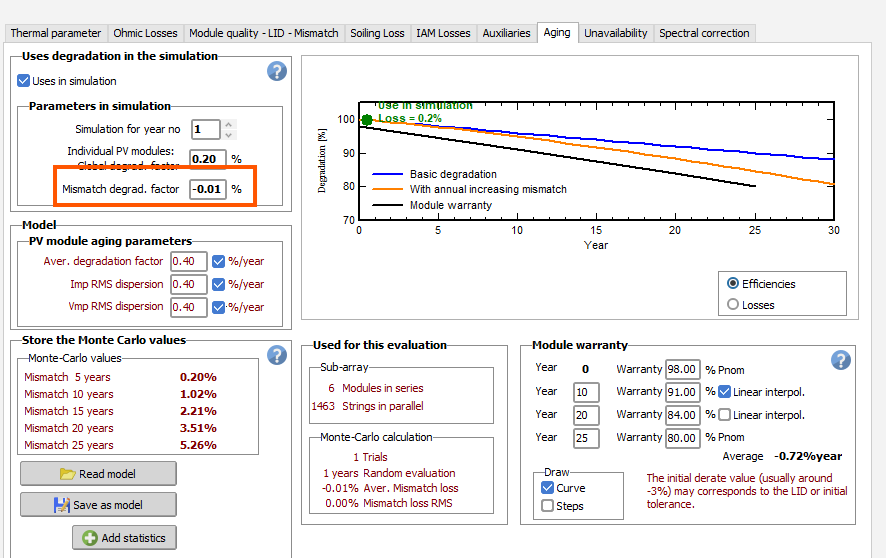
Why first year mismatch degrad. factor is not zero? Why it has a negative -0.01% value?

-
 Myron joined the community
 -
 corepeptides9 joined the community
 -

Decomposition and transposition models
James Barry replied to dina.christensen.martinsen's topic in Meteo data
Thanks for the clarification. Indeed there is a large amount of literature on the topic. It would probably make sense to be able to use the same model for both time scales, or at least to provide this option. Another question - do you use the Perez-Driesse model [1] for the sub-hourly transposition, as discussed here: https://forum.pvsyst.com/topic/3644-continuous-perez-driesse-model/ . This model performs well for high resolution data and removes discontinuities in the modelled diffuse component. Without this improvement one can get discrete jumps in the results at minute time scales. It also performs well for reverse transposition. Driesse, A., Jensen, A. R., & Perez, R. (2024). A continuous form of the Perez diffuse sky model for forward and reverse transposition. Solar Energy, 267, 112093. https://doi.org/10.1016/j.solener.2023.112093 -
 Bhaskar solanki joined the community
 -
Trackers appear as "polygonal fields" -- problem using PVC scenes
LauraH replied to LauraH's topic in Problems / Bugs
For the same objects, I get the message "For 16 fields in the 3D scene, the orientation is not attributed." Not being sure whether these objects are being treated as trackers, I'm not inclined to spend the time trying to fix this, but this is an error, not a warning. Is there any way I can have PVsyst ignore this? I could just delete those objects. It's a big shading scene. -

Decomposition and transposition models
Luca Antognini replied to dina.christensen.martinsen's topic in Meteo data
Hello James! ==> Beware that you are comparing those model on a single location: Erbs might could be less biased than DIRINDEX at another location. Usually, if those models were fitted on a dataset large enough, they should reach a very low global bias. ==> It always makes sense to improve our models, for hourly timescale as well. We compared so far the ability of Engerer2 and Erbs to reproduce ground measurement of 113 weather stations (IEA-PVPS dataset). We are going to carry this comparison more in depth for several additional model in the future, with in particular DIRINT, that is used for example by Meteonorm, and potentially DIRINDEX as well. These comparisons will serve the purpose of documenting our implementations of the models accross PVsyst version notably. However, those kind of study already exists in the literature, but none of them point to a universal model yet that would outperform greatly all the others. Edit: For the moment, for hourly simulation, the Erbs model is still used. Note well that those models are used only in the case of custom weather import where no DHI data are provided. -

Unusual results in the modeling of bifacial vertical PV
sofya replied to sofya's topic in Problems / Bugs
Thank you very much! It’s not obvious that additional configuration of the bifacial modules is required. I thought it was enough to select them in the system. -
Unusual results in the modeling of bifacial vertical PV
Michele Oliosi replied to sofya's topic in Problems / Bugs
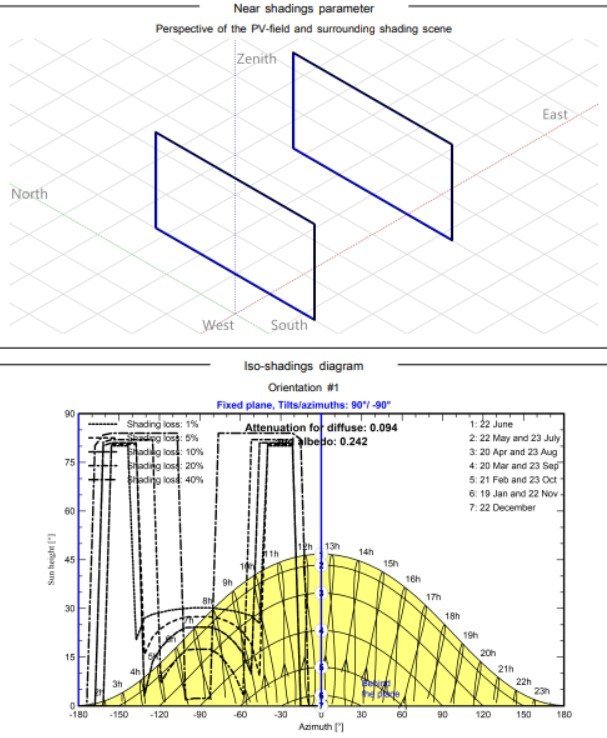
Hi, Thanks for reaching out on the forum. The main difficulty is that front side and backside are modeled differently in PVsyst. Starting with the shadings in the iso-shadings diagram, these shading factors are only applied to the front side. This is why the shading just shows up on negative azimuth side, which must be the front side in your case. The backside shadings are applied differently: they are inherent to a view factor model. The back side is mainly modeled as defined in the System > Bifacial system window. There, you should activate a bifacial model, and make sure albedo coefficients are consistent with the front side ones (found in the project settings). The structure shading factor should be chosen as zero to match what happens on the front side (unless there is some component clutter in the backside, cables, combiner boxes, etc). Moreover, I'd recommend choosing a mismatch loss factor in the Bifacial system window equal to the front side's electrical shading loss. This latter factor will appear in the loss diagram if you choose a fitting model in Near shadings: either the partition model (according to module strings) or the module layout model (detailed electrical calculation). -
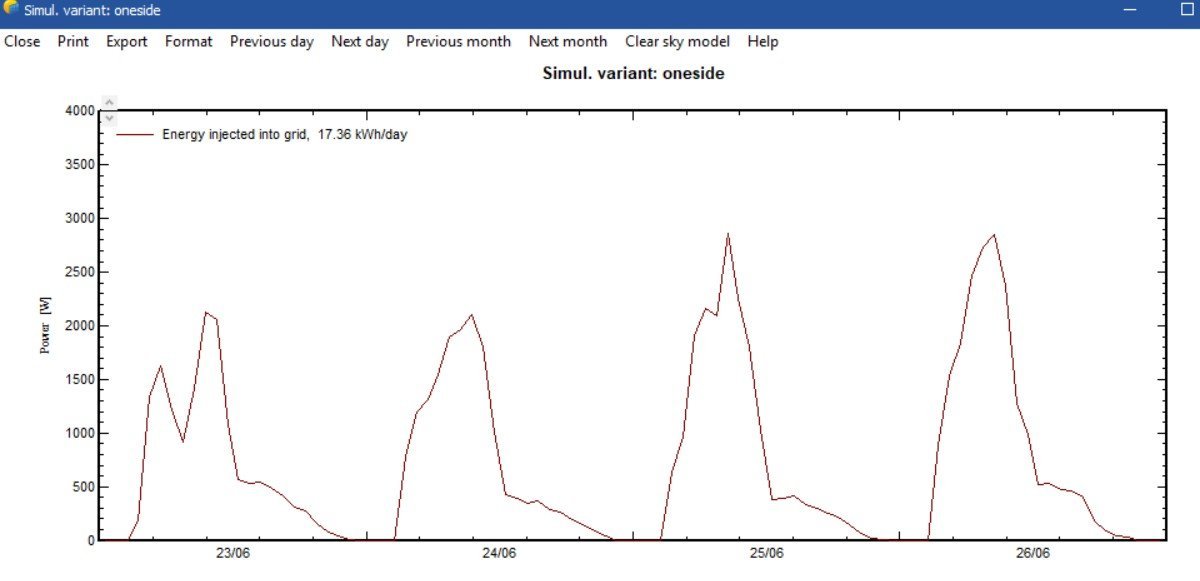
I came across unusual results when modeling a solar power plant. 2 rows of 4 modules at a distance of 4 meters from each other. They are located in the far north. I can't interpret the shading graph. Shouldn't it be symmetrical about noon? The hourly production schedule is also unclear. The gap in the mine should be at noon (when the sun is shining into the end of the panel). But here it is strongly shifted, and the output gradually decreases in the evening.
-
sofya joined the community
-

How to generate .SIT files for PVsyst outside PVsyst ?
Hizir Apaydin replied to VUG's topic in How-to
Dear Vo, Yes, you can generate .SIT files outside of PVsyst by using the PVsystCLI tool. One of the features of this command-line tool is the ability to create site files directly from location coordinates and a monthly weather dataset, without requiring any interaction with the PVsyst GUI. You can find more details about this feature in the following documentation: https://www.pvsyst.com/help-cli/use-cases/create-site.html https://www.pvsyst.com/help-cli/reference/index.html#create-site Best regards, -

Contributing Factors to Inverter Loss over nominal inv. power
Robin Vincent replied to Tina Dornbusch's topic in Simulations
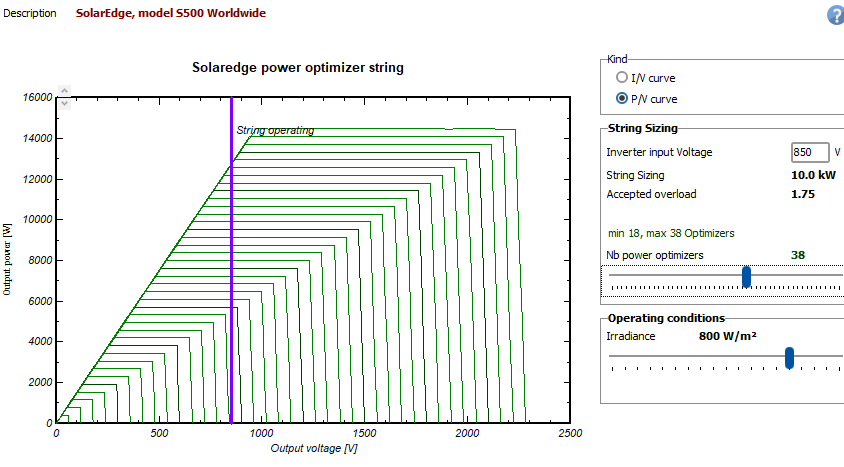
Inverter loss over nominal power usually represents the energy lost due to the inverter max AC power. It can also include the energy lost due to the grid maximum power if the option "Account as separate loss" in the power limitation window is not selected. Having optimizers in your system should have a very limited impact on the inverter clipping losses, as long as they are not limiting the max string power. With SolarEdge, this will mostly depends on the number of optimizers per string. In the example below, the max string power cannot be reached. The string operates at constant voltage (850V), but the max optimizer current is 15A so the max output power is limited to 12.75kW. In this situation, the clipping that used to be necessary at inverter level will occur at optimizer level. You can check this by looking at OP_Imax or OP_Pmax values, respectively, the clipping loss due to the max optimizer current and max optimizer power. NB: There is a known issue in PVsyst 8.0.15 to 8.0.21 that overestimates the current clipping losses. If you are in this situation, please use PVsyst 8.1.0 or later. In the case of the inverter, the percentages are expressed based on EArray, not Egrid. Could that explain the discrepancies you are seeing ?
-
 Please help me understand what drives "inverter loss over nominal inv. power" in the loss waterfall. I was under the impression that this was essentially just clipping losses from high DC:AC ratio, but this appears to be incorrect based on project modeling to compare SMA Core1 inverters against SolarEdge inverters. For a project in California where I modeled this comparison, I kept all factors the same except the inverter and slight changes in DC:AC ratio due to different inverter sizes. Waterfall losses show: SMA inverters, 1.18 DC:AC ratio: 4.5% inverter loss over nominal inv. power SolarEdge inverters with DC optimizers, 1.19 DC:AC Ratio: 0% inverter loss over nominal inv. power For reference, I ran a similar project in New Jersey which shows: SMA Inverters, 1.42 DC:AC ratio: 2.4% inverter loss over nominal inv. power Solar Edge Inverters, 1.37 DC:AC Ratio: 0.8% inverter loss over nominal inv. power Is there something in the optimizer function that is causing this substantial difference, and the discrepancy between impacts in NJ and CA? I will also note that, in trying to understand the difference, I produced an hourly report of the California project with SMA inverters including all inverter losses, which actually left me more confused. I've provided, for reference, the results of summing the hourly values for different inverter losses and dividing by EGrid, which I assume should give us the appropriate loss percentage (but please tell me if I'm thinking of this wrong): InvLoss: 7.63% IL_Oper: 2.88% IL_Pmin: 0.00% IL_Vmin: 0.00% IL_Vmax: 0.00% IL_Imax: 0.00% IL_Nigh: 0.02% Thank you for any help you can provide!
 -
Hi, I would like to understand is it possible to generate .SIT files to use in PVsyst but generated with an external algorithm ? Is there a standard format example that I can consult for the preparation of the .SIT file ? I would like to do this in order to be able to do a batch simulation on multiple points when I don't have already the file prepared with the classical method in pvsyst. Thank you!! Vo
-
 Irtubes joined the community
 -
The Cutoff Time is <= than the time step duration.
Luca Antognini replied to Nikoloz's topic in Problems / Bugs
Hello, Sorry for this warning message, it is nothing to worry about. It doesn't impact the simulation and can be ignored. It will be removed in 8.1.01. It is related to the thermalisation time of your subarrays compared to the simulation timestep. But it should not have been classified as a warning, only an information for internal use at PVsyst - because it should be present in the back for conditions that are actually suitable for a good simulation. -
 I would like to suggest allowing the Bifacial Mismatch Factor to be defined individually for each PV module type within a project, rather than as a single global value. This would provide greater accuracy for simulations using multiple bifacial technologies or module architectures in a single variant. Thank you for considering this enhancement to the bifacial modeling workflow.
 -
 dirtbikes4677 joined the community
 -
Hi, We have defined the DC Ohmic losses to be 2.00% of STC for each subarray. However, in the report, it is presented as differing values 1.94-1.96%. We haven't used the detailed calculation tool. The calculated Ohmic values are the same in the Detailed Losses configuration and the report for each subarray, which suggests that the model is calculating the % loss with different STC powers to the report? In case it is relevant, it's a SolarEdge system with multiple orientations spread across multiple inverters. Thanks.
- Earlier
-
Large Discrepancy in Total AC Power After Simulation
Robin Vincent replied to Jherche's topic in Simulations
PVsyst will use the value specified as the inverter AC power, in this case 33.3kW. If a difference of 0.1% on the total AC power is a problem, you could copy the inverter, change the max AC power to 33.4kW, and replace 1/3 of your inverters with this new one. As long as the inverter name is unchanged, it will be usable with the same optimizers. -

Large Discrepancy in Total AC Power After Simulation
PranavK replied to Jherche's topic in Simulations
Hello @Robin Vincent, I had a quick question related to a similar scenario. The system I’m working on has a target AC capacity of 900 kW. In PVsyst, I’ve modeled this using 27 units of 33.3 kW (SE100KUS equivalent), which corresponds to 9 inverters. However, PVsyst reflects the total AC capacity as 899 kW (27 × 33.3 = 899.1 kW, rounded). I wanted to clarify the following: Does PVsyst internally use 899 kWAC or 900 kWAC for generation calculations in this case? What would be the best way to model the system so that the AC capacity reflects exactly 900 kWAC instead of 899 kWAC? Appreciate your guidance on this. Thanks!